 Description
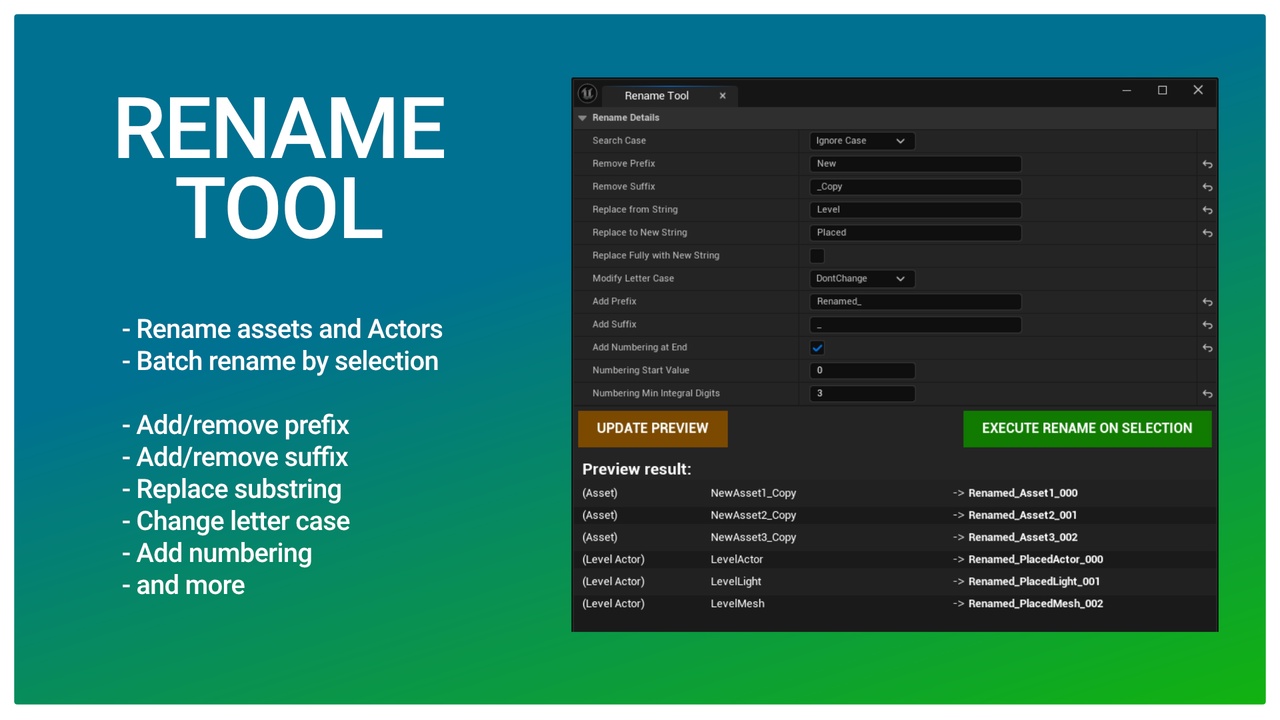
Rename Tool Editor Plugin. Batch rename Assets and Actors easily. Change prefix, suffix, replace substring, modify letter case, add numbering and more.
Technical Details
Main features
- Rename assets in the Content Browser
- Rename Actors in the Level (World)
- Batch rename by selection
- Helper function library
Rename features
- Add/remove Prefix
- Add/remove Suffix
- Replace substring
- Change letter case
- Add numbering
How to use
- Install the plugin for your engine version (in the Epic Launcher / Library, select the plugin, and the “Install to Engine” button)
- Enable the plugin in the Project Settings/Plugins, “Rename Tool”
- Enable “Show Engine Content” and “Show Plugin Content” in the Content Browser settings to see the Engine/Plugins/Rename Tool Content folder
- In the Content Browser navigate to Engine/Plugins/Rename Tool Content/Blueprints
- Right-click EUW_RenameTool and select “Run Editor Utility Widget”
- Select assets in Content Browser and/or Actors in the Level
- Set up Rename Details
- (Optionally) Use the “Update Preview” button to see the rename result before executing
- Click “Execute Rename on Selection” to rename the selected objects
Code Modules:
- RenameTool (Editor)
Number of Blueprints: 2
Number of C++ Classes: 2
Supported Development Platforms: Windows, MacOS
Supported Target Build Platforms: All (Editor plugin)
Important/Additional Notes:
- Full C++ source code included
Login is required to access this downloadLogin is required to access this downloadLogin is required to access this downloadLogin is required to access this downloadLogin is required to access this downloadLogin is required to access this download
VIP Downloads Today: 0 of 0
You can contact us at any time and request that the asset you want be added to the site from the Request Asset section.